🏗 System Architecture
ChildSafeNet is a hybrid AI-powered internet safety platform combining real-time URL detection, AI inference, and browser-level enforcement.
Platform Overview
ChildSafeNet consists of five main layers:
🌐 Web Application
Parent/Admin dashboard for configuration and monitoring.
⚙️ Backend API
Central control layer handling authentication, scanning, and logging.
🗄 Database
Stores users, policies, logs, and datasets.
🤖 AI Engine
Hybrid ML model for URL classification.
🧩 Browser Extension
Enforces blocking decisions in real time.
System Diagram
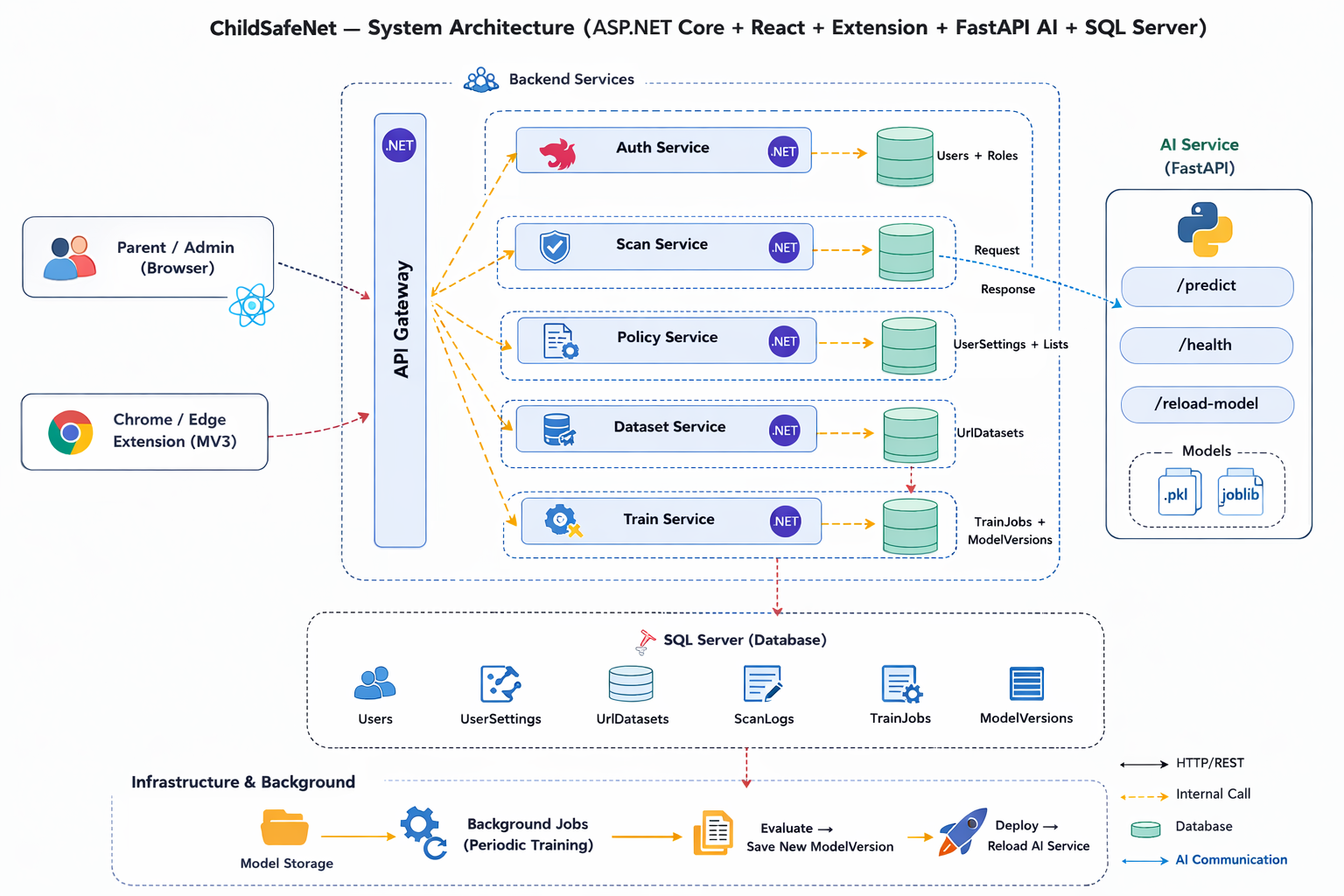
1. High-Level Architecture
2. Core Components
🌐 React Web (Parent/Admin UI)
Responsibilities:
- Authentication (Parent/Admin)
- Protection mode configuration
- Whitelist / Blacklist management
- Scan log visualization
- Dataset review (Admin)
- Trigger model training jobs
- Monitor model metrics
The web application communicates only with the Backend API via secured REST endpoints.
⚙️ ASP.NET Core API
Responsibilities:
- JWT authentication
- URL scanning endpoint (
/api/scan) - Parent settings management
- Scan log persistence
- Dataset collection
- Training orchestration
- Model registry management
The API acts as the central control layer connecting Extension, AI Engine, and Database.
🗄 SQL Server Database
Main tables:
UsersUserSettingsScanLogsUrlDatasetTrainJobsModelRegistry
Purpose:
- Persist all user data
- Maintain complete scan logs
- Manage training datasets
- Track model versions and metrics
All system decisions are fully auditable.
3. AI Engine (Hybrid Model)
ChildSafeNet uses a Hybrid AI detection strategy.
Random Forest Model
- 1000+ handcrafted URL features
- URL entropy
- Symbol patterns
- Token structure
- Suspicious TLD signals
NLP Pipeline
Text-based analysis using TF-IDF or similar features.
Focus areas:
- Adult content
- Gambling content
- Suspicious page language
Hybrid Policy Layer
Combines AI scores and applies category thresholds.
The engine returns:
- Label
- Confidence score
- Decision (Allow / Warn / Block)
4. Browser Extension (Manifest V3)
Responsibilities:
- Detect tab navigation
- Capture URL metadata
- Send scan requests to API
- Enforce blocking decisions
- Display
block.htmlwhen required - Sync with parent protection mode
The extension never makes the final decision locally. All enforcement depends on the API response.
5. Data Flow — Scan Process
Extension or Web sends scan request:
- URL
- Title
- Text
- Source
Endpoint: /api/scan
API processing:
- Apply whitelist/blacklist
- Invoke AI prediction
- Apply parent protection policies
API stores results:
ScanLogsUrlDatasetentries
Decision returned to extension.
6. Option Periodic — Model Training
Step 1 — Continuous Collection
The API continuously stores scanned URLs inside UrlDataset.
Initial state: Pending
Step 2 — Admin Review
Admins review dataset samples.
Options:
- Approve
- Reject
Only approved samples are used for training.
Step 3 — Scheduled Training
On scheduled intervals:
- Merge baseline dataset + approved samples
- Train Hybrid AI model
- Evaluate metrics:
- Accuracy
- Precision
- Recall
- F1 Score
Step 4 — Safe Deployment
New model versions are stored in ModelRegistry.
Deployment rules:
- Previous version kept as fallback
- Quality gates must pass
- Rollback possible if regression detected
7. Design Principles
Summary
ChildSafeNet architecture ensures:
- Real-time threat detection
- AI-powered classification
- Full auditability of decisions
- Safe model lifecycle
- Controlled retraining strategy